


TLDR
A cache hit at Claude, OpenAI and Gemini costs 5–10 % of the normal input price. Anthropic caches only when you ask for it; OpenAI, xAI and Gemini cache automatically. Below a minimum size of 512 to 4,096 tokens, nothing is cached — silently. And almost everywhere, changing the reasoning effort breaks the cache — except on the newest Claude models. Part 1 of the series "What an LLM call really costs".
Introduction
Every chat application follows the same pattern: a long system prompt with rules, tool definitions, maybe a few pages of context — and a short question below it. Without caching, the whole block is processed and paid for again on every call. With a 7,000-token prompt and Claude Sonnet 5, that's 1.45 cents per call before the model has written a single word.
Prompt caching keeps the unchanged start of the prompt at the provider. That sounds like a switch. In practice, it's a question of architecture.
1. How prefix caching works
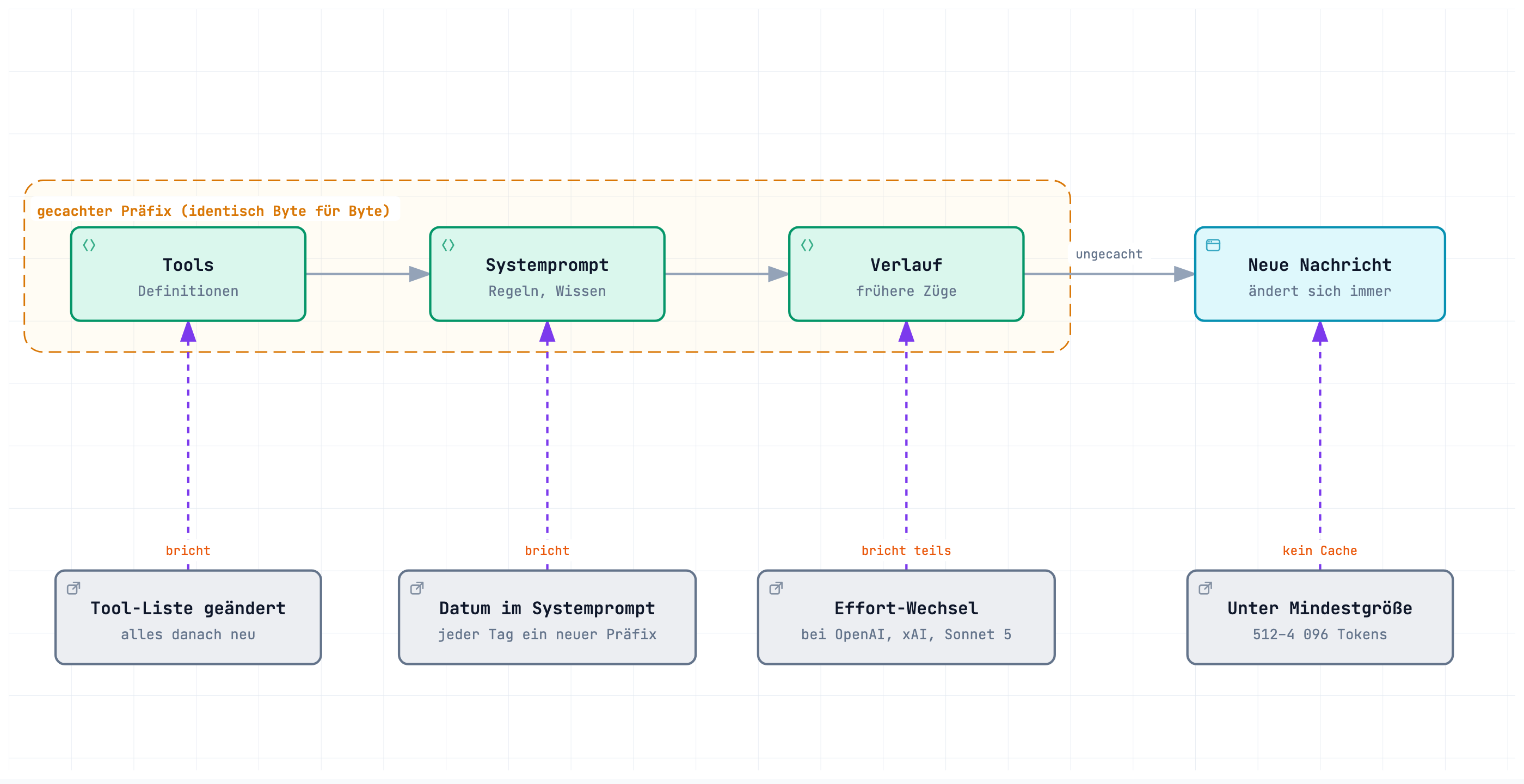
What gets cached is always a prefix: the start of the prompt, byte for byte identical to an earlier call. The order is similar at all providers — tools, system prompt, conversation history, and the new message last. If one byte changes near the front, everything after it is new.
This gives the most important rule: stable parts first, changing parts last.
2. Explicit or automatic
We sent the same prompt (4,568 to 7,240 tokens, depending on the tokenizer) twice in a row and evaluated the cache fields of the second response:
| Provider / model | Control | Hit on 2nd call | Cache write reported |
|---|---|---|---|
| Claude Sonnet 5, Sonnet 5.5, Haiku 5.5 | cache_control (block or top level) |
100 % | yes |
| GPT-6.1 Sol, GPT-5.6 Luna | automatic | 100 % | yes |
| gpt-5-mini | automatic | 98 % | no |
| Grok 4.7, Grok 4.5 | automatic | 99 % | no |
| Gemini 3.8 Flash | implicit | 66 % | no |
| Magistral Medium | prompt_cache_key |
99 % | no |
| Mistral Medium | prompt_cache_key |
0 % | no |
Anthropic caches only with cache_control; without a marker, not a single follow-up call hits. The top-level marker ("automatic" caching) and an explicit block marker gave the same hits in a direct comparison.
The two variants differ only in where the marker sits (second call each, trimmed from our raw data):
// Anthropic – marker on the block
{
  "model": "claude-sonnet-5-5",
  "system": [{
    "type": "text",
    "text": "You are the assistant of …",
    "cache_control": { "type": "ephemeral" }   // ← caches up to and including this block
  }],
  "messages": [ … ]
}
// Response
"usage": { "input_tokens": 16, "cache_read_input_tokens": 7224 }
// Anthropic – marker at the top level
{
  "model": "claude-sonnet-5-5",
  "system": [{ "type": "text", "text": "You are the assistant of …" }],
  "messages": [ … ],
  "cache_control": { "type": "ephemeral" }     // ← Anthropic places the breakpoint itself
}
// Response
"usage": { "input_tokens": 4, "cache_read_input_tokens": 7236 }
OpenAI caches without any extra parameter , reports hits for Chat Completions in prompt_tokens_details.cached_tokens and, on the new models, also reports cache writes. Whether prompt_cache_key raises the hit rate didn't show in our setup — without load, the cache hits even without a key (not measurable).
xAI also caches automatically; a key sent as the x-grok-conv-id header plus prompt_cache_key in the body made no measurable difference in our test. One detail: Grok 4.7 reports 1,152 cached tokens on the very first call — that's xAI's own system prompt, and every request pays for it.
At Mistral, only Magistral Medium cached with prompt_cache_key; Mistral Medium didn't cache at all.
// Mistral – POST /v1/chat/completions
{
  "model": "magistral-medium-latest",
  "messages": [ … ],
  "prompt_cache_key": "88374757"     // ← freely chosen key in the body, not a header
}
// Response
"usage": {
  "prompt_tokens": 5807,
  "prompt_tokens_details": { "cached_tokens": 5760 }
}
3. What a hit costs — and what a write costs
A cache hit is cheap. Writing to the cache isn't necessarily:
| Write | Read | Pays off from | |
|---|---|---|---|
| Claude, 5 minutes | 1.25× | 0.1× (Sonnet 5.5: 0.05×) | the 1st reuse |
| Claude, 1 hour | 2× | 0.1× | the 2nd reuse |
| GPT-5.6 / 6.1 | 1.25× | 0.1× (Sol: 0.05×) | the 1st reuse |
| gpt-5-mini and older | free | 0.1× | immediately |
| Gemini 3.8 Flash | – | 0.1× | immediately |
The factors come from the providers' pricing pages. For our prompt with Claude Sonnet 5: 1.45 cents uncached, 1.81 cents when writing, 0.15 cents when reading.
Tip: The 1-hour TTL only pays off if there are regularly more than five minutes between two calls and the prompt is needed at least twice more afterwards. Because every hit restarts the hour, a regularly used prompt stays cached practically indefinitely.
4. How long does the cache last?
After the first call, we waited 5.5 minutes and repeated it:
| Provider / model | after 5.5 minutes |
|---|---|
| Claude Sonnet 5.5, TTL 5 min | expired |
| Claude Sonnet 5.5, TTL 1 h | hit |
| GPT-6.1 Sol, GPT-5.6 Luna | hit |
| Grok 4.7 | hit |
| gpt-oss-120b via Cortecs | hit |
Anthropic's 5-minute cache does what it promises — and no more. The 1-hour cache lasts beyond the five minutes. And every hit restarts the hour: 61 minutes after the write, the cache still hit, because the hit at 5.5 minutes had extended it. OpenAI's cache, by contrast, survived the pause without any special setting.
At Anthropic, the TTL is a field in the marker. The response reports separately which TTL a write used (first call, trimmed):
// Anthropic – POST /v1/messages
"cache_control": { "type": "ephemeral", "ttl": "1h" }   // without ttl: 5 minutes
// Response
"usage": {
  "cache_creation_input_tokens": 7223,
  "cache_creation": {
    "ephemeral_5m_input_tokens": 0,
    "ephemeral_1h_input_tokens": 7223   // ← written at 2× the input price
  }
}
5. The minimum size
We shortened the prompt to just below and just above the documented minimum size:
| Model | Documented minimum | Just below | Just above |
|---|---|---|---|
| Claude Sonnet 5.5, Haiku 5.5 | 512 | 463 tokens: no cache | 565 tokens: 549 cached |
| Claude Sonnet 5 | 1,024 | 922: no cache | 1,124: 1,110 cached |
| GPT-6.1 Sol | 1,024 | 928: no cache | 1,131: 1,128 cached |
| Gemini 3.8 Flash | 4,096 | 3,684: no cache | 4,508: 2,474 cached |
Below the limit, nothing happens — no error, no warning, just a cache counter that stays at 0. If you wonder why the cache never hits, look here first.
Worth noting: gpt-5-mini and Gemini cache in blocks, so part of the prompt always stays uncached. At Gemini it was up to 45 %.
6. What breaks the cache
The trickiest case is a change of reasoning effort. We sent the same prompt with high, then low, then high effort again:
| Provider / model | Effort changed | Back to the old effort |
|---|---|---|
| GPT-6.1 Sol, GPT-5.6 Luna, gpt-5-mini | cache lost | old cache hits again |
| Grok 4.7 | cache lost | old cache hits again |
| Gemini 3.8 Flash | cache lost | old cache hits again |
| Claude Sonnet 5 | cache lost | old cache hits again |
| Claude Sonnet 5.5, Haiku 5.5 | cache stays | cache stays |
Anthropic documents that a changed effort breaks the cache. That's true for Sonnet 5, but no longer for the 5.5 generation. At OpenAI, xAI, Gemini and the open-weight models, every change costs the cache. The old entry is kept, though: if you switch back, it hits again.
In the request, a single field changes. What the response makes of it depends on the model (second call, trimmed):
// Anthropic – 2nd call, only the effort differs
{
  "system": [{ …, "cache_control": { "type": "ephemeral" } }],
  "messages": [ … ],
  "output_config": { "effort": "low" }   // ← "high" in the 1st call
}
// Response Claude Sonnet 5: cache written again
"usage": { "cache_creation_input_tokens": 7224, "cache_read_input_tokens": 0 }
// Response Claude Sonnet 5.5: hit
"usage": { "cache_creation_input_tokens": 0, "cache_read_input_tokens": 7222 }
Other cache breakers according to the docs: a changed tool list (not measured). And anything that creeps into the front of the prompt — date, time, user name, a session ID.
Lesson Learned: A reasoning effort chosen "intelligently" per request can eat the whole cache saving. Set the effort per conversation, not per message.
7. How we solved it in .NET
In our library Evanto.ChatClients, the Anthropic client sets two markers: the top-level marker for the conversation history and its own breakpoint on the system prompt. We needed the second one because the top-level marker alone didn't hit across several conversation turns:
var cacheControl = new AnthropicMessages.CacheControlEphemeral { Ttl = cacheTtl };
var marked       = messages.ToList();

if (options?.Instructions is { } instructions)
{
    marked.Insert(0, new ChatMessage(ChatRole.System,
    [
        new TextContent(instructions)
        {
            RawRepresentation = new AnthropicMessages.TextBlockParam { Text = instructions, CacheControl = cacheControl }
        }
    ]));
}
Source: MarkAnthropicSystemPrompt (excerpt)
The stable system prompt deliberately moves to the front. A system message with the current date, which CompanyWizard adds on every conversation turn, now sits behind the breakpoint and no longer breaks the cache.
Note: Through routers, Claude currently gets no explicit caching in our setup — which puts it exactly in the gap that Part 4 describes.
8. What we deliberately left open
- Load: All measurements ran without parallel load. This setup doesn't show whether
prompt_cache_keyorx-grok-conv-idhelp under load. - Tool changes: we didn't measure them.
- Gemini 4 Argon: not measured because of a quota limit.
- Long TTLs: We checked Anthropic's 1-hour TTL after 5.5 and 61 minutes. We didn't measure when it expires without a hit in between.
Conclusion: patterns you can reuse
- Build the prompt in layers: tools → stable system prompt → history → new message. Date and user data go last.
- Check the minimum size: if the cache counter stays at 0, the prefix is probably too short.
- Set the effort per conversation, not per message.
- Log the cache fields: record read and write per call — that's the only way to see whether the cache works.
- Choose the TTL by usage pattern: 5 minutes for chats, 1 hour for rare but recurring batch runs.
All raw data and scripts: github.com/evanto-media-ag/llm-caching-reasoning-costs
The series
- Part 1: Prompt caching compared — what carries the cache and what breaks it
- Part 2: Reasoning effort compared — seven values, twelve interpretations (coming soon)
- Part 3: Cost transparency — formulas, field names, price sources (coming soon)
- Part 4: Routers compared — Cortecs, EU Router, Requesty, OpenRouter (coming soon)
References
- Anthropic: Prompt caching
- OpenAI: Prompt caching
- xAI: Prompt caching
- Google: Gemini caching
- Mistral: Prompt caching
Is your system prompt paid for again on every call? Let's spend 30 minutes on your specific workflow — no obligation, no cost, with concrete next steps at the end. Book a 30-minute call
Note: Article created with AI assistance.