

TLDR
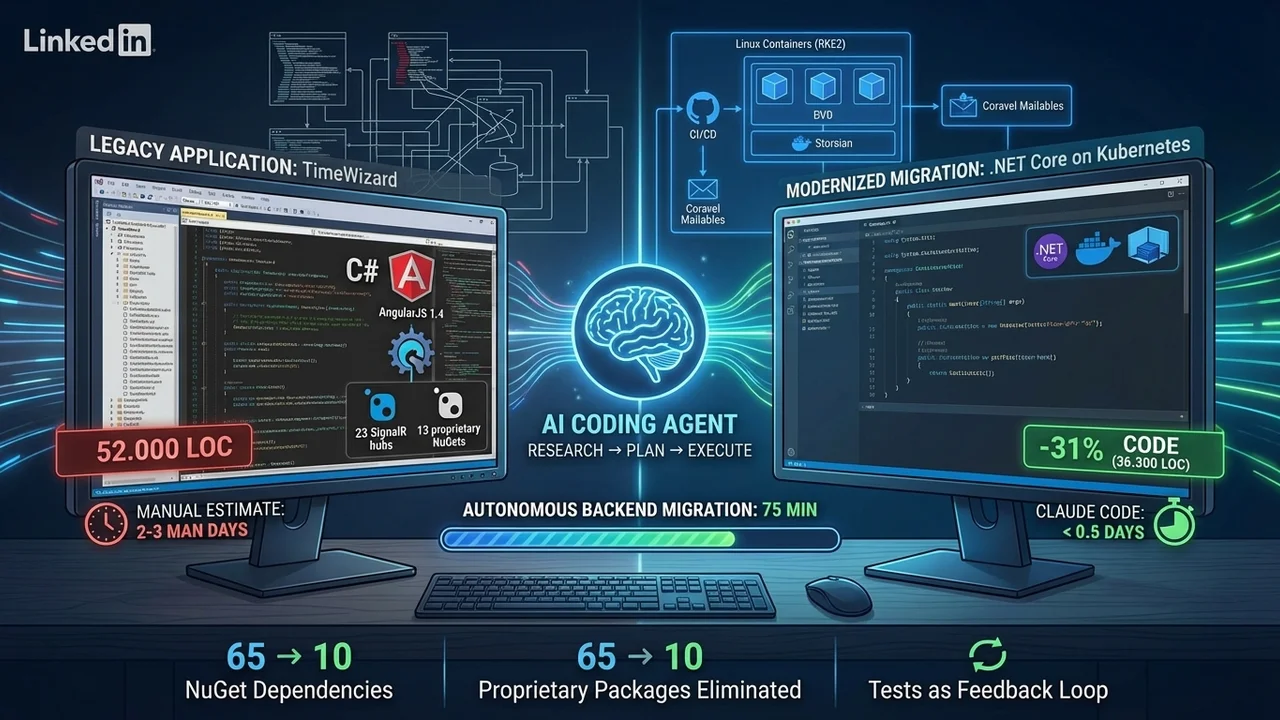
A ten-year-old enterprise application (52,300 LOC, .NET Framework 4.7 + AngularJS 1.4) was migrated to .NET 10.0 with Claude Code in less than half a person-day — including the elimination of 13 proprietary NuGet packages, containerisation and a frontend upgrade. The key pattern: Research → Plan → Execute. Result: 31% less code at identical functionality, cross-platform capable and CI/CD-ready.
Introduction
Every .NET developer knows the type: the legacy application that has been running reliably on a Windows Server for years, with a migration that's been 'on the roadmap' forever — only 'forever' has the unpleasant habit of never quite arriving. At TimeWizard it was no different. A ten-year-old enterprise application with 52,000 lines of code, 23 SignalR hubs and 13 proprietary NuGet packages. The need to migrate was obvious; the prospect of doing it by hand was equally off-putting.
The actual trigger wasn't strategic awakening but Microsoft's calendar: Windows Server 2016 was nearing the end of its security updates. Since our hosting infrastructure now runs on Rancher RKE2 Kubernetes, upgrading to a newer Windows Server version would not only have cost money, it would have inflated a parallel tech stack permanently. The migration via coding agent was therefore a test — not only for the time savings it could deliver, but also for the underlying approach.
This article documents how we ran the migration with Claude Code as our coding agent in less than half a person-day — and which patterns turned out to be transferable.
The starting position
TimeWizard is a multi-tenant enterprise application for time tracking and task management (first built in 2015). The system was based on .NET Framework 4.7 with ASP.NET MVC 5 and Web API 2 in the backend, combined with an AngularJS 1.4 single-page application in the frontend. Real-time communication ran on SignalR 2.4, persistence on Entity Framework 6.3 against MS SQL Server.
Architecture at a glance
The backend solution consisted of 10 C# projects with 151 classes and around 20,300 lines of code. Particularly characteristic: 23 SignalR hubs — nearly every entity had its own hub with standardised CRUD operations via a generic base class. All database access ran through a single repository class TWRepository with 29 public methods — a classic god-object anti-pattern.
The frontend was built as an AngularJS SPA with 49 routes, 88 HTML templates and around 16,200 lines of JavaScript. A separate Windows service with Quartz.NET handled scheduled tasks.
Overall complexity
| Metric | Value |
|---|---|
| C# projects in the solution | 10 |
| C# classes | 151 |
| Entity / model classes | 23 |
| Web API controllers / SignalR hubs | 12 / 23 |
| Angular controllers / services / directives | 44 / 86 / 34 |
| NuGet dependencies (unique) | 65 |
| Lines of backend code (C#) | ~20,300 |
| Lines of frontend code (JS + HTML) | ~32,000 |
| Total lines of code | ~52,300 |
Technical debt — the greatest hits
Opening the repository, you stumbled across an impressive collection of technical debt — each item with the unmistakable scent of 'this seemed like a good idea at the time':
- No automated tests. No unit tests, no integration tests. Every change required manual testing — at 52,000 lines of code, a serious gamble.
- An aged frontend stack. AngularJS 1.4 had reached end-of-life in January 2022. Together with jQuery 2.1 and Bootstrap 3, a trio that hadn't seen security updates in years.
- 13 proprietary Evanto.Common NuGet packages formed the foundation of the application — from the repository base class through authentication to the SignalR infrastructure. Tight coupling that turned every modernisation into a major project.
- Windows lock-in. .NET Framework 4.7 ruled out both containerisation and cross-platform deployment. Configuration ran through Web.config transformations — awkward and error-prone.
- No database migrations. The schema existed only implicitly in the DbContext. Reproducible deployment? More wishful thinking than reality.
The approach
The migration followed a deliberately sequential flow in eleven steps. The basic principle: migrate the backend fully first, then touch the frontend only enough so it can talk to the new backend, and finally update the JavaScript dependencies. Each step was issued as a standalone prompt to Claude Code — the literal prompts are documented below as block quotes.
1. Establish project context with CLAUDE.md
Before the agent can work productively, it needs an understanding of the existing codebase. For this we used the custom command /create-rules — an extended variant of the built-in /init command. The command analyses the tech stack automatically, recognises the project type and directory structure, extracts naming conventions from the existing code and generates a CLAUDE.md file in the project root.
This step deliberately comes first, because the quality of every later plan and implementation depends directly on how well the agent understands the project.
2. Create a migration plan
In the second step, we asked Claude Code in /plan mode for a detailed migration plan. The central strategic decision: backend first, leave the Windows service out for now, touch the AngularJS frontend only as far as needed for the SignalR connection. The proprietary Evanto.Common libraries should be eliminated as far as possible.
The application has basically three parts, classic .NET 4.7 backend, scheduler and AngularJS frontend. Please create a detailed plan how to migrate the backend to latest .NET core 10 framework. Don't touch scheduler in first step and the AngularJS UI only as far that it is able to connect to the migrated backend (mostly done via SignalR web sockets connection).
Clarify if all needed dependencies (external libraries) can be migrated too. If not, research alternative solutions. Ask questions if there are things to clarify or implementation options so that we are finally on same track. The source for the Evanto.Common.* libraries is in folder ./common/lib. Basically I do want to eliminate as much as possible of them. Please migrate the absolutely necessary parts to project specific libraries in a ./lib folder. Split the migration in multiple steps if it is to complex to be handled in one step.
Why this prompt works: it sets clear guardrails (backend first, leave the scheduler), names the goal for the proprietary libraries explicitly, invites clarifying questions and lets the agent estimate complexity itself and split the work if needed. Claude Code then produced a multi-stage plan, identified non-migratable dependencies with alternative suggestions, and asked clarifying questions on implementation options.
3. Execute the backend migration
The execution of the migration plan ran fully autonomously — 75 minutes without a single interruption or clarifying question on a Mac M4 Pro. In that time, Claude Code migrated the entire backend codebase from .NET Framework 4.7 to .NET 10.0, ported the SignalR hubs to ASP.NET Core SignalR, replaced the Evanto.Common libraries with project-specific implementations, and adjusted the frontend-side SignalR connection.
4. Generate a migration report and validate
After the run, we asked for a detailed report on the current status. This step is about validation: which parts were migrated successfully, which open points remain? A concrete example: the source project used two connection strings (application database + authentication), the migrated project only one.
Please write a detailed report about the execution of last plan (migration from .NET 4.7 to .NET core). Check open issues and current status, e.g. in user management (source project has two connection strings for app and authentication, target project only one for app database, whats with the authentication?).
5. Modernisation and best practices
With the working backend as a basis, we followed up with a series of targeted prompts to bring current .NET best practices into the project. Each prompt addressed one specific topic:
Central Package Management — Directory.Packages.props, Directory.Build.props and global.json for centralised version management:
Please introduce a centralized management via introducing Directory.Packages.props, Directory.Build.props, and global.json to enable easier management.
Package updates and SLNX format — updating all NuGet packages and switching to the modern solution format:
Please update all packages to latest versions but no preview versions. Verify with building solution. Please convert the .NET solution file from SLN to SLNX format and verify build.
Containerisation and CI/CD — Dockerfile and GitLab-CI pipeline:
Please create me now a Dockerfile and a .gitlab-ci file in root ./ for ./src/TimeWizard.Web website project. Take EXISTING_PROJECT as reference.
Email sending with Coravel Mailables — migrating to the Coravel Mailable pattern, with an existing project as a reference:
Please create me a plan to migrate the email sending in the ./src project to Coravel Mailables. Please identify first all places where mails are sent and update then to Coravel Mailables. See following project for reference: EXISTING_PROJECT
Configuration via environment variables — .env-based configuration for sensitive data:
I do want to support configuration by environment variables via an .env file to avoid storing sensitive credentials like connection string and passwords in appsettings.json. Please create me a suitable .env file and adapt configuration loading in Program.cs. Modify also .gitignore to avoid storing the .env file in GIT.
6. Backend test
Since the project had no automated tests at all, we validated the migrated backend manually. The only immediate issue: PDF generation. The original application used Windows system fonts that simply don't exist on macOS or in Linux containers. A typical migration problem when moving to cross-platform .NET. The fix — a custom PdfSharp FontResolver that resolves fonts from embedded resources — was generated automatically by Claude Code after we pasted the error message from the application log as the prompt.
7. AngularJS upgrade
For the frontend modernisation we deliberately chose a three-step approach: Research → Plan → Execute. In the first step, Claude Code was asked to find out which AngularJS version a safe upgrade was possible to:
The project contains an AngularJS 1.4.x frontend. Latest AngularJS version is 1.8.4. Please make a careful research how we can update AngularJS to a higher 1.x.x version without breaking the JavaScript Dependencies.
The finding: version 1.8.3 is the last release that actually exists (1.8.4 was never published as a full release). Claude Code then produced an upgrade plan and executed it after approval.
8. jQuery and the rest of the JavaScript dependencies
Following the same Research → Plan → Execute pattern, we updated the remaining frontend dependencies. The biggest jump was jQuery from 2.1.4 to 3.7.1. The three-step approach has proven a reliable pattern for upgrades that span several major versions, because the agent identifies breaking changes before execution and accounts for them in the plan.
9. Regenerate CLAUDE.md
After all migration steps were done, we regenerated CLAUDE.md with /create-rules. This step is necessary because the state of the project has changed fundamentally: new framework, new project structure, different dependencies. For the agent to work with current context during the following frontend fixes, the CLAUDE.md must reflect the migrated state.
10. Frontend testing and bug fixing
After the JavaScript upgrades across several major versions, regressions were to be expected. When problems appeared, two paths were available: pass screenshots and console logs as a prompt — or, much more efficient, give the agent the URL of the running application and let it investigate the bug itself. For the latter we used two browser-automation tools: the claude-in-chrome plugin and Playwright MCP.
In total, around 10 UI issues had to be fixed. Time required: 90 minutes. One important finding: reading the browser console and fixing JavaScript errors works more reliably and faster with Playwright than with claude-in-chrome.
11. README.md as onboarding guide
To close out, Claude Code generated a developer-focused README.md that serves as an entry point for new developers, documenting setup, configuration and architectural decisions.
Create a user focused README.md as onboarding guide especially for new developers joining the TimeWizard project.
Timeline overview
| Step | Description | Duration | Mode |
|---|---|---|---|
| 1 | Generate CLAUDE.md | ~5 min | Autonomous |
| 2 | Create migration plan | ~15 min | Interactive |
| 3 | Backend migration | ~75 min | Autonomous |
| 4 | Migration report | ~10 min | Autonomous + review |
| 5 | Modernisation & best practices | ~30 min | Series of prompts |
| 6 | Backend test | ~20 min | Manual + prompt |
| 7–8 | AngularJS + JS upgrades | ~30 min | Research → Execute |
| 9 | Regenerate CLAUDE.md | ~5 min | Autonomous |
| 10 | Frontend test & fixes | ~90 min | Manual + agent |
| 11 | Generate README.md | ~5 min | Autonomous |
| Total | ~4–5h | < 0.5 person-day |
Result
Key metrics
52,300 → 36,300 LOC (−31%) | 65 → 10 NuGet packages | Windows-only → cross-platform | Effort: <0.5 person-day vs. estimated 2–3 person-days manually
Before / after in detail
| Metric | Before | After | Delta |
|---|---|---|---|
| C# classes / files | 151 / 165 | 158 / 172 | +7 |
| Entity / model classes | 23 | 18 | −5 |
| ViewModel classes | 55 | 63 | +8 |
| Web API controllers | 12 | 11 | −1 |
| SignalR hubs | 23 | 24 | +1 |
| NuGet dependencies (unique) | 65 | 10 | −55 |
| Lines of backend code (C#) | ~20,300 | ~12,800 | −37% |
| Lines of frontend code (JS + HTML) | ~32,000 | ~23,500 | −27% |
| Total lines of code | ~52,300 | ~36,300 | −31% |
What we gained
The codebase shrank by 31% at identical functionality — mainly through the elimination of the proprietary libraries and the leaner patterns of ASP.NET Core. The application now runs platform-independently in Linux containers on our RKE2 cluster. Autofac was replaced by the built-in Microsoft DI container, email sending was migrated to Coravel Mailables, and configuration now uses .env files instead of Web.config transformations. The frontend security holes (jQuery XSS, AngularJS prototype pollution) are closed by the updates to current versions.
What we deliberately left open
Not every piece of technical debt was addressed — that was a deliberate scope decision:
- No automated tests. Validation continues to be manual. For an application that probably won't see active feature development going forward, the ROI for adding test coverage wasn't there.
- AngularJS stays. The frontend was updated to 1.8.3, but not migrated to a modern framework. The high complexity from the many add-on components makes a fully automated migration unrealistic.
- No scheduler. The Windows service for due-date notifications was removed, but not yet replaced by Coravel Scheduler.
Challenges and lessons learned
Proprietary library dependencies
The biggest challenge was getting rid of the 13 internal Evanto.Common NuGet packages. These libraries were designed as a shared foundation for multiple applications and were correspondingly tightly interwoven — from the repository base class through authentication to the SignalR infrastructure. Claude Code had to identify the relevant parts, extract them into project-specific libraries and adjust all references. The decision to dissolve these dependencies completely rather than migrate them along increased the initial effort, but eliminates a substantial maintenance burden long term.
Lesson learned: proprietary library dependencies are not a black box for a coding agent — provided the source code is available. Pointing the agent explicitly at the source-code path in the prompt was decisive.
Platform-specific PDF issues
The original application used Windows system fonts for PDFsharp/MigraDoc, which are not available on macOS or in Linux containers. This problem only became visible during manual testing. The FontResolver was then a one-prompt fix once we pasted the error message.
Lesson learned: platform-specific obstacles when leaving Windows-.NET are hard to anticipate up front. A manual test run after the backend migration is essential.
Cascading JavaScript upgrades
AngularJS 1.4 → 1.8.3 and jQuery 2.1 → 3.7.1 across several major versions pulled around 10 UI issues along with them. Identifying and fixing these regressions was the most time-consuming manual part of the migration (90 minutes), but was effectively supported by Playwright MCP.
Lesson learned: the three-step Research → Plan → Execute pattern is gold for multi-major upgrades. The agent identifies breaking changes before execution and plans accordingly.
Missing test coverage
No tests in the original project meant: fully manual validation after every step. In a project with existing test coverage, the agent could have run the tests automatically after each change and caught problems earlier.
Lesson learned: tests are not just for humans — they are the most effective feedback loop for coding agents.
Conclusion and context
Effort and cost
The entire migration was finished in less than half a person-day (see timeline above). Done purely by hand, at least 2 to 3 person-days would have been realistic — conservatively, since understanding and rewriting the proprietary library dependencies alone would have required substantial analysis effort.
The API costs for using Claude Code came to around €30–40 for the entire migration. Measured against the working time saved — even on a conservative calculation — an excellent ROI.
Transferable patterns
Three patterns turned out to be applicable across projects:
Research → Plan → Execute. Particularly for upgrades across several major versions. The agent researches breaking changes, produces a concrete plan and only executes it after approval. That reduces the risk of bad decisions considerably compared with a direct 'just do it' prompt.
CLAUDE.md as a steering instrument. Generated once at the start to give the agent a sense of the current state, and a second time after the migration is done to lock in the new project state for any follow-up work.
Targeted prompts instead of a mega-prompt. The modernisation (step 5) shows it: a series of focused prompts — each with a clearly bounded topic — delivers better results than a single prompt asked to do everything at once.
Where the approach hits its limits
The migration also shows where agent-supported modernisation runs into walls today. The AngularJS frontend was deliberately not migrated to a modern framework — AngularJS's missing component architecture and the many add-on components make a fully automated migration unrealistic. Likewise, neither automated tests nor database migrations were introduced; both would have expanded the scope substantially and watered down the time advantage.
Who is this approach for?
Particularly for projects where the manual migration effort has been judged too high until now, and the migration kept getting pushed back — exactly as with TimeWizard. The combination of structured planning by the agent and targeted manual validation makes it possible to carry out even substantial legacy migrations with manageable effort.
The prerequisite: the developer has to understand the target system and be able to assess the agent's output critically. The coding agent doesn't replace technical competence — it accelerates execution.
References
- Claude Code documentation
- Pragmatic Claude Code Usage for C# Developers on Mac — our article on the basic Claude Code setup for .NET development
- Coravel Mailables documentation
- Playwright MCP server
- Claude in Chrome
- Context Engineering (Colin Medin)
- PDFsharp/MigraDoc